Toy Offensive Yunit - Skip to the showpiece!
This post is currently a work in progress and is currently missing some video sections, other than that its all here!
Overview
This project was the first ive taken on in a group of this size and the first time ive been properly allocated a lead role instead of just taking it on as the oppurtunity arose. The brief was to make a sandbox shooter game for one of the designers at Rebellion games in England which resulted in us making a Sandbox tactical shooter game similar to the hitman series with some of our own unique twists on it.
Over the past five or so months of development time I have personally sunk hundreds of hours into this project and have intereacted with every system in the game. I have coordinated cross discipline communication and worked in depth with the art and design leads to facilitate a smooth workflow between all of us, along with individually communicating with every member of the team to ensure that the project was a success.
The project is currently publically available on GitHub at the time of writing and will soon be released on Itch.io as well and I will link to it on here once that is done. The showpiece of this post includes a download link along with video of the game.
Pre production
Naturally the first step on a project of this scale was the pre production. For code this included setting out guidelines and conventions as to how we will work, familiarising ourselves and the team with our chosen version control system, and constant liasion with the designers over what was going to be possible for us to implement.
Documentation
The first element of this which I would like to focus on was our documentation and guidelines. One of the core pillars of how we wanted to work on this project was that the designers would be doing all of the final implementation and balancing of the systems which the programmers had made. To facilitate this several guidelines were layed out on how the programmers would design systems to make them easier to use for the designers. These include the use of headings and tooltips in inspector windows along with working with a scriptable object based system to minimise per scene conflicts.
These thought processes also resulted in the foundations of what would become this games spreadsheet importer system which is something I worked on heavily throughout the beginning of this project.
We also made sure to include guidance on common conventions such as naming, code formatting and structure, and commenting.
Version control
Another core element of the project as with any was its version control. As we had already agreed that the project would be developed in the Unity engine it made the most sense to use GitHub for this as its something all the programmers were familiar with and it works well with the Unity engine. The other option would have been Perforce however I decided against this as it has quite a steep learning curve and I intended to have all members of the project working off of the GitHub some of whom had not used version control previously.
One of the things which I was adamant on from the beginning of the project is that all members of the group would be working both in engine and off of GitHub. This was of particular relevance to the artists. Previously in group projects I have ran into extensive issues when in the integration phase where a large percentage of art assets will not work due to being incorrectly setup or having minor issues and it adds an extremely large amount of load onto whatever discipline ends up having to fix them, usually in my experience this ends up being the programmers. To solve this I set out rules that all art work would be submitted via an art GitHub branch and must include a setup and configured Unity prefab, this assured that the artist themselves had seen their asset in the project and working to entirely rule out these issues.
As it turns out now that the project has been completed this was probably one of my best decisions. There were almost no issues with art assets throughout implementation of them and all of the artists and now familiar with working with version control tools and concepts like branching and merging.
Design liasion
Finally I would like to speak on the code teams liasion with the designers at the start of the project. When we were initially conceptualising the project there was constant discussion between code and design of what was possible with us evaluating systems when they were presented to us by design. This helped a lot to cut down on scope and feature creep and maintain an achievable MVP.
We created a range of lists and breakdowns of systems that would need to be implemented and begun working out how they could be assigned to the different programmers to play to their strengths. For example our programmer with the most AI experience, Ollie, ended up working on AI and AI adjacent systems for the entire duration of the project with the rest of the more generic tasks being split between myself and Jasper.
Development and meeting our MVP
Core systems for the MVP
Leaderboard
Natrually development began with a focus on our core systems for our MVP. The first one of these which I developed was a simple networked leaderboard and database which users could access ingame and submit scores to. This was how our game intended to do achieve its replayability value without having a complex narrative or largely increasing the projects scope in some other way.
This leaderboard can even be viewed online: Leaderboard!
Weapons
The beginning
Once this was done I begun working on what would be one of my core tasks throughout the project, this would be the weapons system used by the player and AI. Weapons systems in games is something I specialise in and is an area which I have a lot of experience in as most of my previous projects seem to include some form of first person shooter elements.
With this weapons system also came something which would be pivotal to the way which data was managed in the project and how the designers would interact with it in the future for balancing. Those of you reading this who have experience working on larger projects know how extremely time consuming balancing and just entering of values into a game engine can be, this is something which I have a lot of experience with and I intended to solve in this project.
Progression
The weapons system was designed from its core to be as modular as possible. This included allowing for things like weapons firing multiple shots at the same time, different fire modes, different amounts of spread, and even entirely different ballistic methods.
One of the first things I did was the weapon spread, this is something I haven't done before but it was supposed to be like in games such as Fortnite where the more you shoot the more the crosshair expands and the less accurate your gun becomes.

This was actually quite an interesting and complicated system to implement and took several days of development time. In concept its quite simple but it was hard to come up with a way to actually do it which didnt look extremely strange to the player. I was also trying to make it so the spread automatically scaled with the weapons fire rate and mag capacity which I did end up doing succesfully but this added a lot of complexity to how it all worked.
I then worked on the different ballistic methods. The initial concept was to use raycasts for all the shots and then use a physics based system for things such as arrows from the bow and rockets from the rpg. This resulted in me making an extremely efficient physics based projectile system using realworld velocity and mass for projectile movement.
This system ended up being so good I and the designers concluded we wouldnt do raycast projectiles at all and all projectiles would be physics based, however this would later come with its issues.
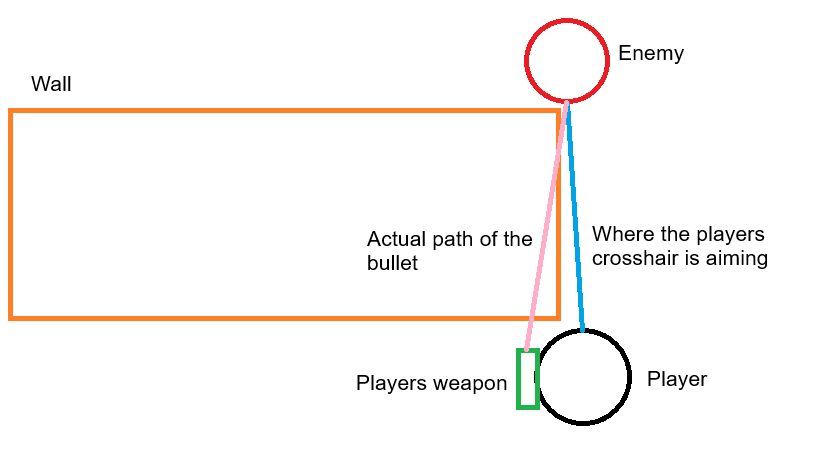
One of the problems with the physics based projectiles in third person is that the players aim point wasnt from the gun it was offset to where their crosshair was up and to the right of it. This is problematic when using projectiles that shoot from the barrel of the gun as what if the players crosshair is properly aligned with an enemy but theres something in the way when going there from the gun, as is illustrated in this image.
Another issue, and the biggest one in this case, is how to determine the depth of where the gun should shoot. Because its aiming from an offset if its aiming somwhere 100m in the distance it will go 100m behind where the player is aiming. Logicially to fix this youd just use what the player was looking at as the end destination and use this when calculating the vector which the projectile moves on. However, how does this work when leading shots at distance? The gun would just be angling itself to shoot a wall well behind your target.
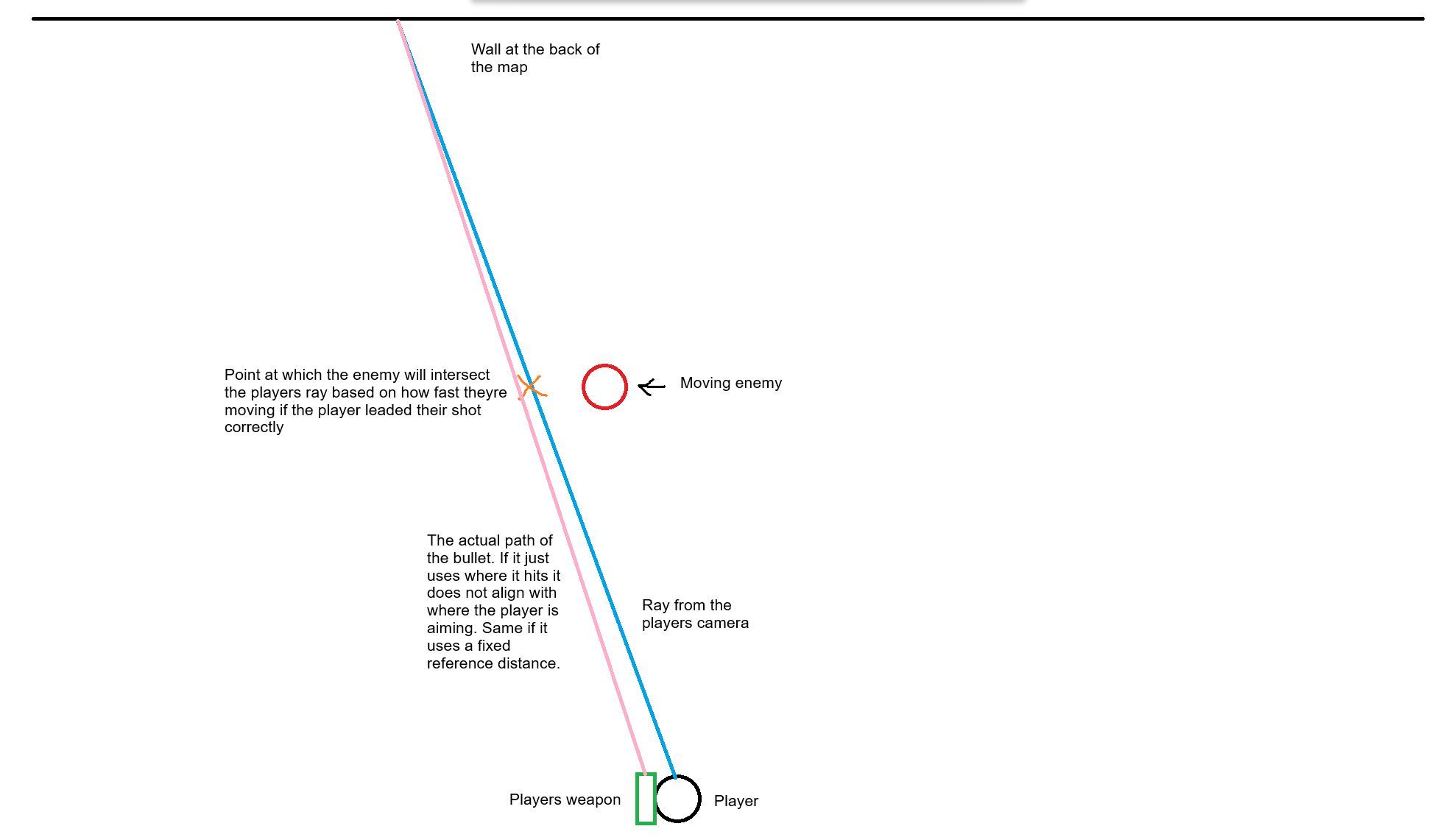
This was actually an extremely difficult issue to solve and it took several weeks of being aware of the issue before it was fixed. There were a lot of changes made to the angle which the gun fired from, the position of the cameras, the maths of how the gun fired but nothing ever worked. So here is my solution, im not sure if its a good approach but it made sense to me and the game feels fine now and no one has complained about it so i'll take it as a success.
Ok so my solution. This is a bit strange and sort of hard to explain but ill do my best. When the player shoots a ray is fired from their camera where they are aiming. If they are aiming directly at an enemy, as in their cursor is on an enemy, the gun will shoot with a direction from its start position to where the ray hit the enemy. This garuantees if you are shooting directly at an enemy who is not moving the gun will be shooting at the correct point in space, this is illustrated in the image below.
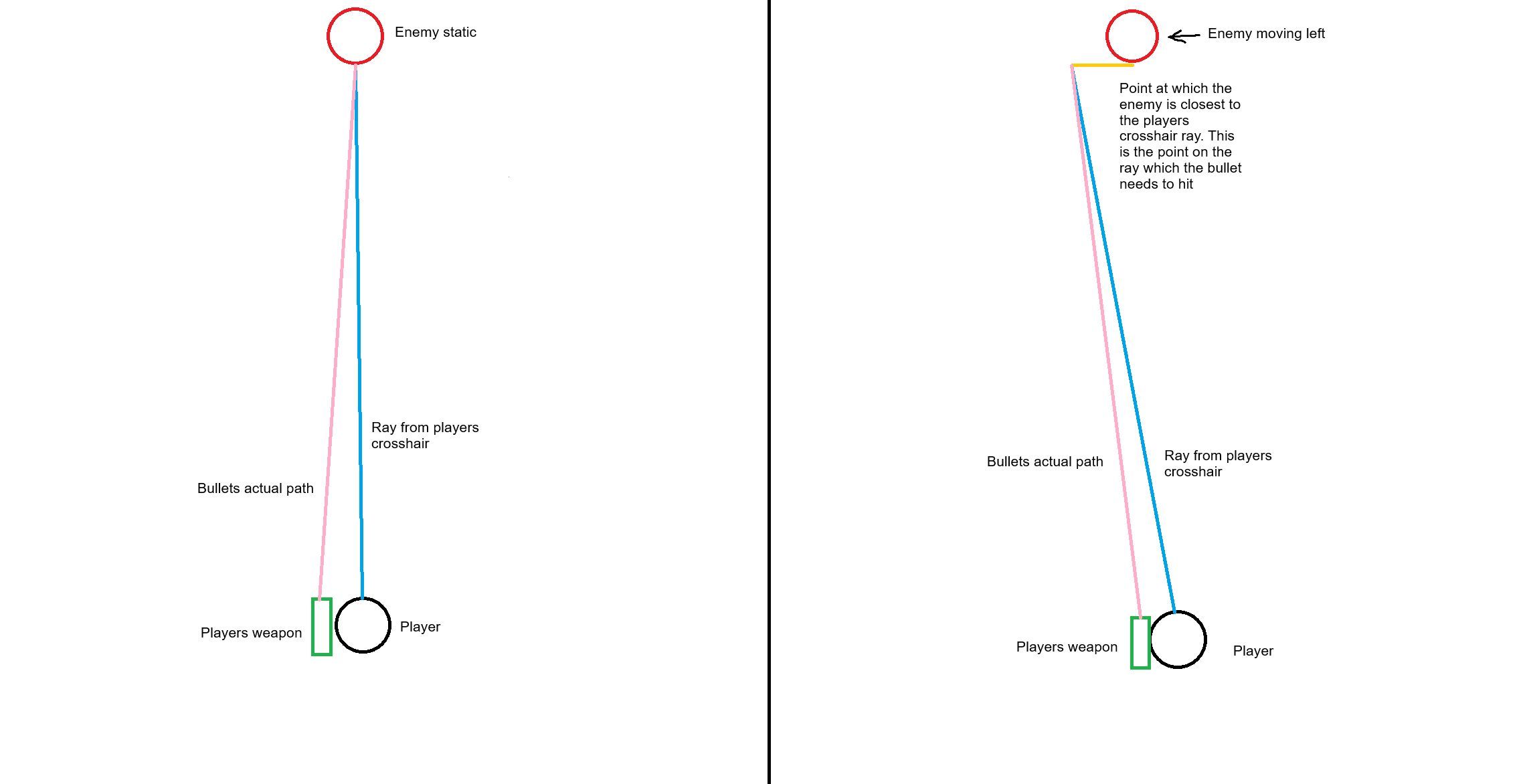
Next up how do you solve leading shots at distance? The same concept doesent work here as it might end up shooting at the angle to hit something 100+ meters behind the enemy you are shooting. So instead I also do a large sphere cast (its more of a cylinder in practice) down the length of the ray from the players camera. If that camera ray didnt hit anything this sphere cast happens. If it hits an enemy it chooses the one closest to the players camera ray assuming this is the one which the player is trying to hit. It then finds the closest point on the players ray to that enemy, this gives it the depth of where it should be trying to shoot. What this means when its all together is that the gun can set its direction vector to shoot at a point in space in front of an enemy with the same depth as that enemy, resulting in the bullet actually going where you want it to.
// try direct ray from the camera first to see if we hit an enemy
if (Physics.Raycast(ray, out hit, fallbackDistance, enemyLayerMask))
{
    shotDestination = hit.point;
    // debug for direct hit
    Debug.DrawLine(ray.origin, hit.point, Color.green, debugDuration);
    DrawDebugSphere(hit.point, 0.2f, Color.green, debugDuration);
}
else
{
    // if no direct hit, fire a SphereCast (thick ray pretty much) to find a nearby enemy where that enemy is located
    // find multiple enemies in a that cast
    RaycastHit[] hits = Physics.SphereCastAll(ray, sphereRadius, fallbackDistance, enemyLayerMask);

    // debug the spherecast path as a tube
    DrawDebugSphereCast(ray.origin, sphereRadius, camForward, fallbackDistance, Color.red, debugDuration);

    if (hits.Length > 0)
    {
        // find the one closest to the actual center ray
        RaycastHit bestHit = hits[0];
        float closestDist = float.MaxValue;

        foreach (var h in hits)
        {
            // project the hit point onto the ray to see how far it is from the center line
            Vector3 pointOnRay = Vector3.Project(h.point - playerCamera.transform.position, camForward) + playerCamera.transform.position;
            float distToRay = Vector3.Distance(h.point, pointOnRay);

            // debug each potential target found in the sphere
            Debug.DrawLine(h.point, pointOnRay, Color.yellow, debugDuration);

            if (distToRay < closestDist)
            {
                closestDist = distToRay;
                bestHit = h;
            }
        }

        // calculate destination based on the depth of the best enemy found
        float depth = Vector3.Distance(playerCamera.transform.position, bestHit.point);
        shotDestination = playerCamera.transform.position + camForward * depth;

        // debug best target
        DrawDebugSphere(bestHit.point, sphereRadius, Color.green, debugDuration);
        Debug.DrawLine(playerCamera.transform.position, shotDestination, Color.cyan, debugDuration);
    }
    else
    {
        // fallback if absolutely nothing is nearby
        shotDestination = playerCamera.transform.position + camForward * fallbackDistance;
        Debug.Log("Using fallback");
    }
}
In game it looks like this.
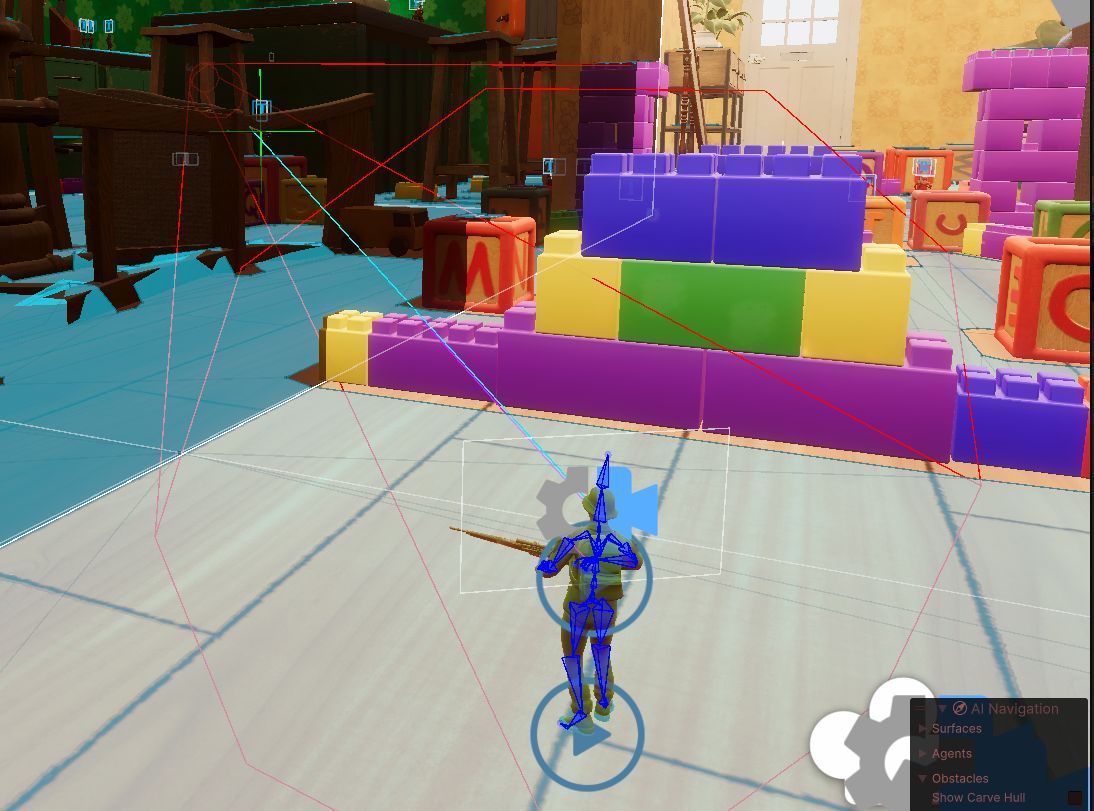
The cyan line is the line from the players camera showing directly what they are looking at when they take the shot. The red cylinder is the spherecast, this is getting all of the enemies within its radius, and finally there is the green cross. This is better seen from another angle
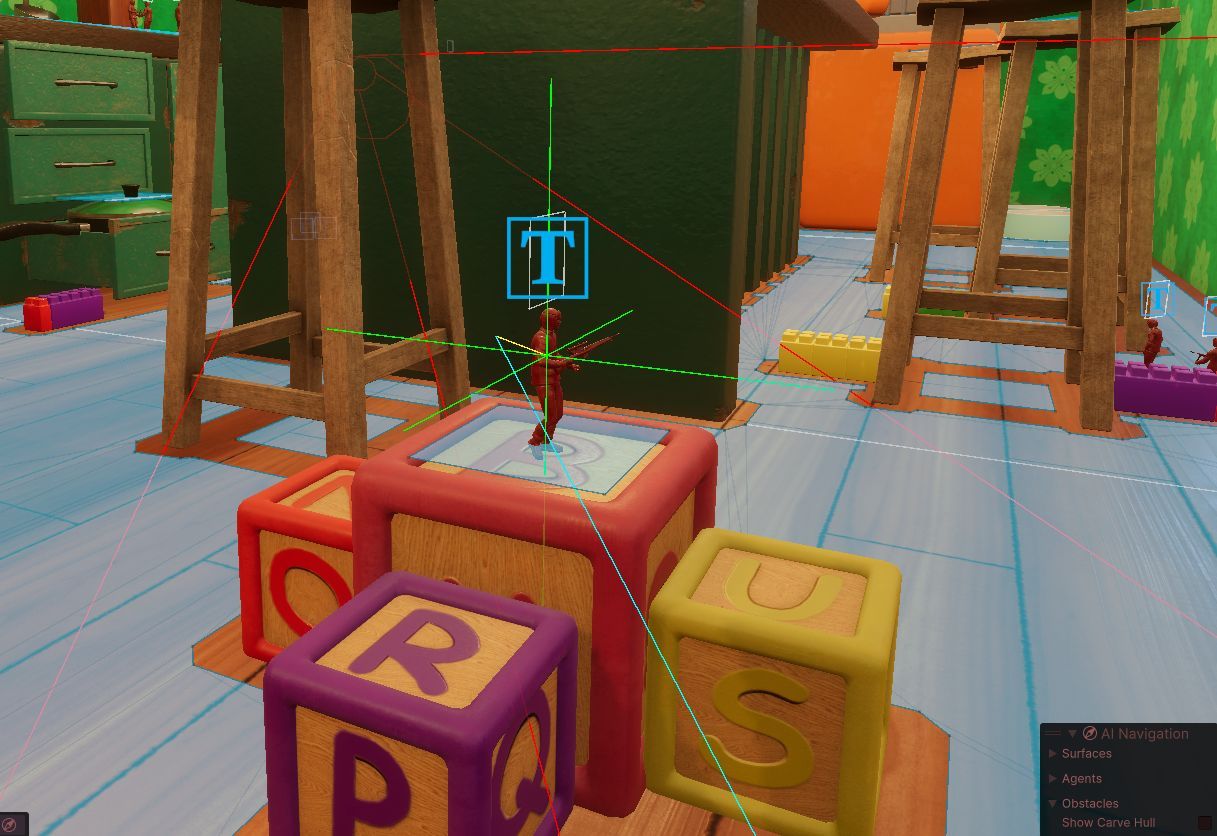
In this image you can see that the players sight line is not directly hitting the enemy, it is slightly to the left, emulating the player leading a shot. The green cross is the enemy which is nearest to the players point of aim. The small yellow line is the line between the enemy to the nearest point on the players view line. This point where the yellow line contacts the cyan line is the exact point that the gun will shoot at, accounting for the depth of the enemy which the player is shooting at.
This system, though slightly strange, seems to solve all of the problems with the weapons ballistics in this third person context. The only issue with this system is the potential for it set the depth on the wrong enemy when shooting at a group at distance. This however does not really matter as if the player still hits an enemy it is not a bad experience for them, its only a bad experience if they miss.
This system could very easily be extended upon to add systems such as aim assist for the player as well, although that was not done in this case as it did not really fit with the concept of the game.
The final product
Overall the games weapons feel great now without any major issues apparent in how they work. All the feedback about it has been positive and I am extremely happy with how it turned out in the end.
The spreadsheet importer
The beginning
The concept of the spreadsheet importer was that for the majority of balancing and importing of weapons and items the process could be automated with the designers only having to edit simple numerical values on a spreadsheet to customise elements of the game. Initially this was only developed for the weapons system but was designed in an extremely modular object oriented way which allows for it to be used for pretty much anything in the project.
It started off as a very simple system with a generic csv importer which let you import from a csv file and generate scriptable objects to be used in runtime based off of it.

Progression
Over time this spreadsheet importer ended up being implemented into far more systems than just the weapons. In the end it controlled Guns, Throwables, Attachments, and even the games sounds using a variety of different tables.
I even ended up tying it into the google sheets api to streamline development even further and making a full UI for it inside of Unity to make it as intuitive as was possible. This allows for rapid iteration of design changes and balancing of systems with almost no time consuming manual value changing in editor.
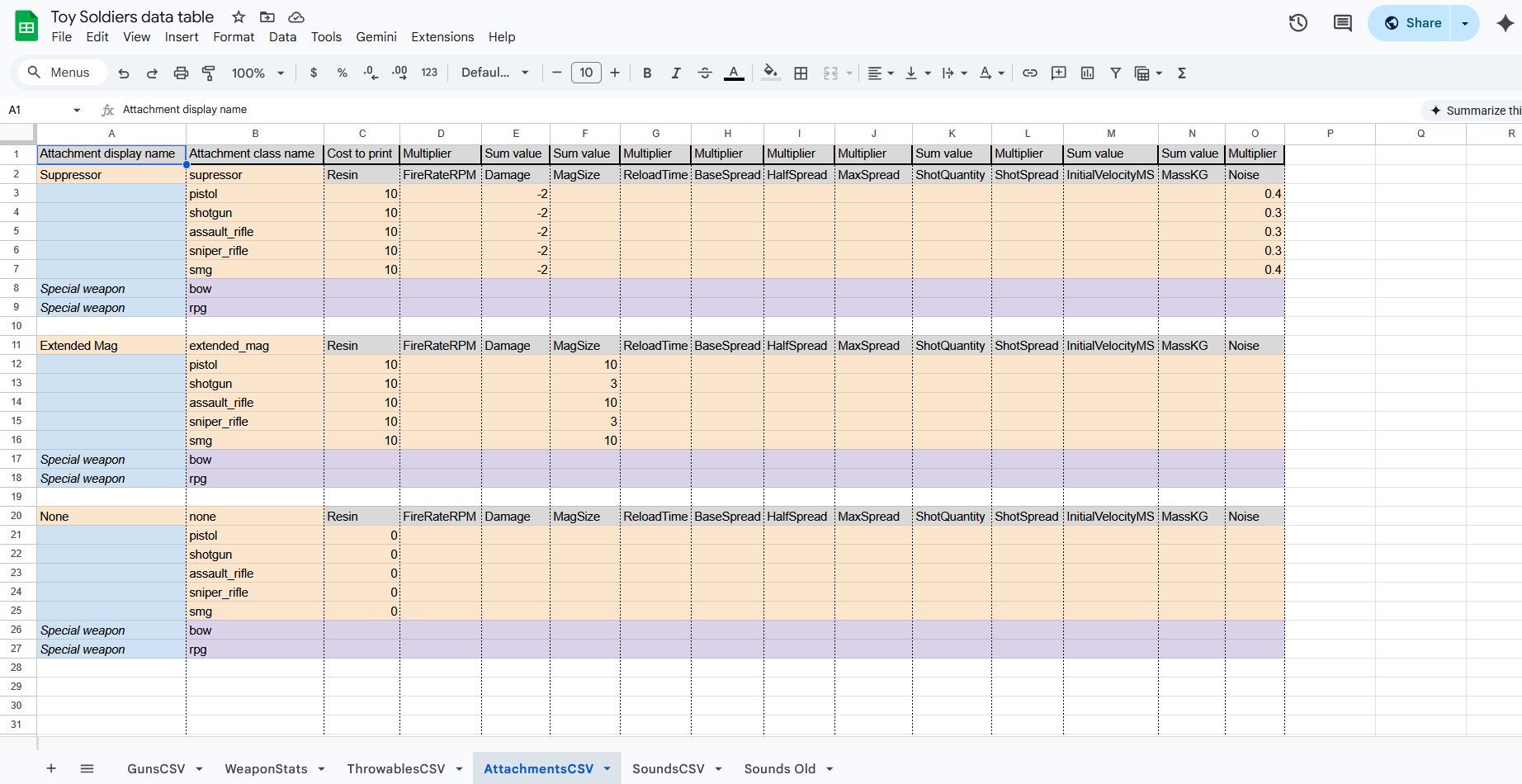
Some of the sheets such as the one for the attachments are far more sophisticated and allow importing of a wide range of values on a sheet split into sections for improved readability for the designers
The final product
The final spreadsheet importer is something I am extremely proud of. It is a system which I will take forward into future projects which I work on and it has a lot of potential as a paid asset if I could streamline setting up different sheet layouts for it.
The system really speaks for itself and in the end was indispensable tool to the designers especially throughout the final stages of balancing where rapid iteration was imperative. This tool has been shown off to several developers in industry and has been recieved extremely positively and has also made me realise I would quite like to pursue being a tools programmer in the future.
Other miscellanous systems
Throughout the project naturally I worked on many other smaller systems than the ones I wanted to focus on here. But I will try to give most of them a section here.
Climbing
Climbing is one of this games unique selling points and is by far one of the most problematic things in it. I will not take much credit for anything to do with this games movement as it is almost entirely Jaspers creation. However, I was responsible for making it so that the player can climb around corners consistently, and it was so interesting to work on that I would like to speak on it somewhat.
Climbing in this game is a very challenging system to develop as the player can climb on every object in the scene and it is fully dynamic, this makes it impossible to test every situation and edge case as there are just too many options. One of the first issues I noticed with climbing was that the player simply could not climb around corners, this really did not feel great.
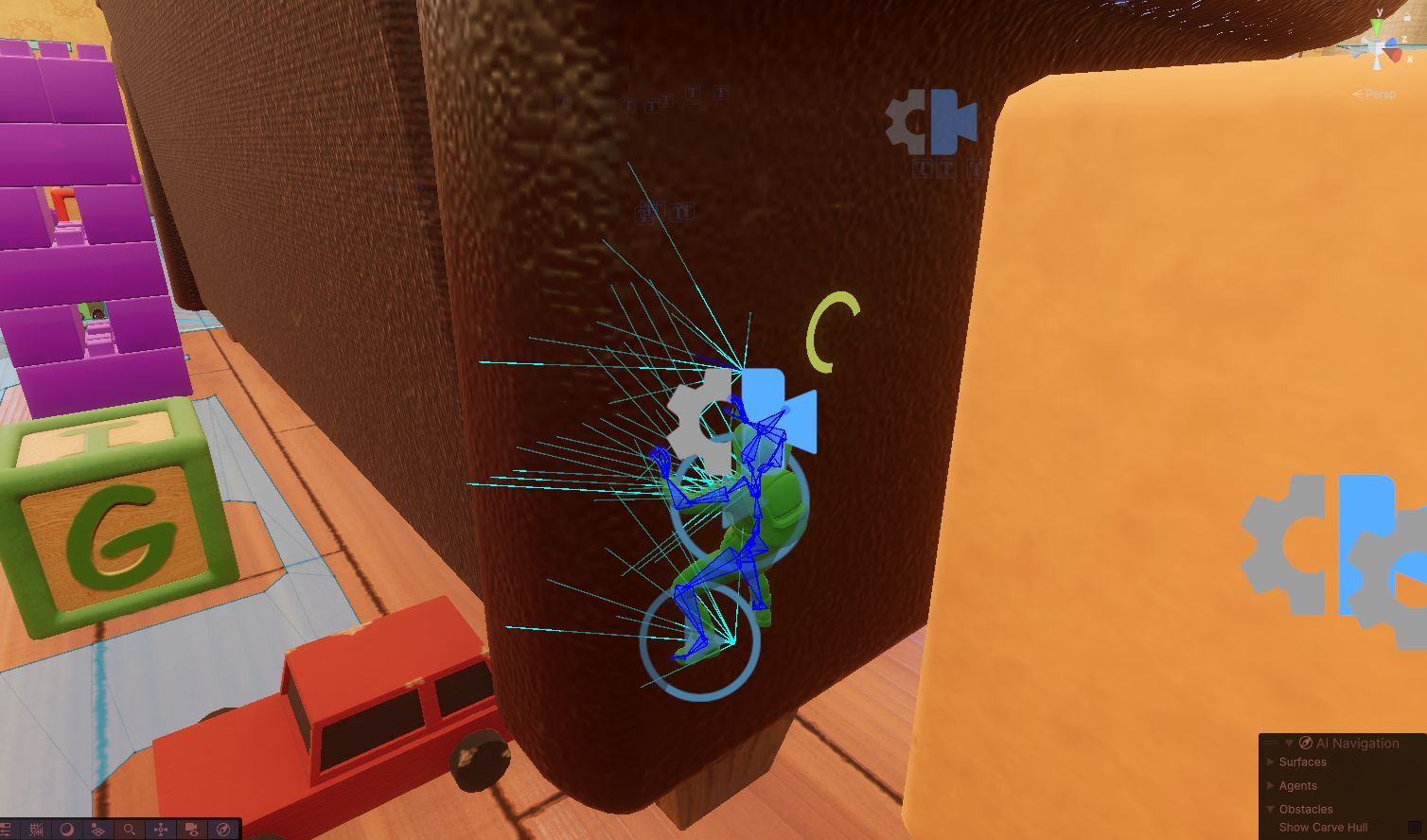
Climbing works by shooting a series of rays from the player at the surface in front of them and using those to generate a sort of plane which the player climbs on that changes relative to the shape of the surface they are on. The issue with corners was fairly interesting, if you are on a wall with a 90 degree bend how will the climbing system know that you can climb around it to the side?
My solution to this was simple but extremely effective. I first added a system which added 2 new rays either side of the player that would rotate with the players movement. If the player is moving left on a wall the left ray will angle towards the right 45 degrees, this allows it to point at walls around a 90 degree corner to the player giving that climbing plane a point of contact. Then to improve reliability of these I made a system which generates a cone of rays instead of just a single point. This gives the climbing plane far more points of contact and helps a lot with consistency on uneven or angled surfaces. This replaced all of the rays on the player so they are all cones.
// Check if middle can find wall
RaycastCone mainCone = new RaycastCone(mainOrigin, direction, detectionRange, Settings.ClimbableLayer, detectionAngle);
bool foundWall = mainCone.CastRays(out IList<RaycastHit> hits, out Vector3 mainNormal) && CheckNormalVertical(mainNormal);
if (foundWall)
{
    // Assume can climb in all directions initially
    climbDirections = ClimbDirections.Up | ClimbDirections.Down | ClimbDirections.Left | ClimbDirections.Right;

    // setting up cones
    RaycastCone topCone = new RaycastCone(topOrigin, direction, detectionRange, Settings.ClimbableLayer, detectionAngle);
    RaycastCone bottomCone = new RaycastCone(bottomOrigin, direction, detectionRange, Settings.ClimbableLayer, detectionAngle);
    RaycastCone rightCone = new RaycastCone(mainOrigin + widthOffset, direction, detectionRange, Settings.ClimbableLayer, detectionAngle);
    RaycastCone leftCone = new RaycastCone(mainOrigin - widthOffset, direction, detectionRange, Settings.ClimbableLayer, detectionAngle);

    // when moving left, the right cone looks left
    if (currentInput.x < 0)
    {
        rightCone.LookLeft();
    }
    // when moving right, the left cone looks right
    else if (currentInput.x > 0)
    {
        leftCone.LookRight();
    }
    // when moving down, the top cone looks down
    if (currentInput.z < 0)
    {
        topCone.LookDown();
    }
    // when moving up, the bottom cone looks up
    // this is the only one of these that is strictly necessary, it stops the character from returning to the floor when starting to climb
    else if (currentInput.z > 0)
    {
        bottomCone.LookUp();
    }
Throwables
Another interesting system in this game is its throwables. Initially there were going to be a wide range of these from emps to frag grenades however in the end due to scope almost none of these got implemented. Luckily fragmentation grenades still were so I can talk about them here.
Throwables were somewhat of an experiment in how far I could push the spreadsheet system for automated setting up of gameplay elements. When you import throwables from the sheet it makes a new folder for them and creates a new throwable object based on the generic one already in there. This is then all automatically assigned to a scriptable object to be used in game and has all of the required values from the spreadsheet.
This is all well and good for grenades that just explode, but what if they need to do more? To solve this I made a generic base throwable that has various functions that can be overridden for when its thrown, explodes, etc. The importer already knows of the existing types of these currently which is Explosive and Flash but you can add as many different types as you want and the importer will add the components all for you.
public class ExplosiveGrenade : ThrowableTemplate
{
    protected override void OnDetonate()
    {
        Debug.Log($"Detonating explosive grenade with damage of {Damage}");

        // play animations effects sounds etc (the type already does the damage for you (if its a flash it does 0)
        var particle = Instantiate(DetonateParticles, transform.position, Quaternion.identity);
        particle.Play();
        particle.transform.parent = null;

        wwisePlayer.PlaySound(detonationSound);

        // destroy the object
        Destroy(gameObject);
    }
}
In practice this is an extremely convinient system and automates what would be an extremely large amount of manual assignment.
// video here
Pickups
One system which I was tasked with making was pickups. These would be for a wide range of different things but for the MVP it was just health and ammo. To do this I took inspiration from the game Team Fortress Two with how their pickups instantly are collected and spawn below a player or enemy when they die.
I devised a system using scriptable objects where you can set everything up in an object in the Unity editor. You set its type, either ammo or health, and then the quantity and the prefab object it'll spawn.
This was a really simple system for the designers to use and is an example of where the spreadsheet system could have been used, but it simply was not worth the implementation time for this little quantity of objects.
// video here
Sound and AI Hearing
An interest of mine which I have had for a few years now is sound in games. In particular how it can effect gameplay and immersion and how it can be used to assemble a soundscape around a player. For this project we had a dedicated sound designer Scott who made all of the sounds used in the project.
I was tasked with actually implementing these sounds in engine as I had previous experience from my Universities Game Audio module. The sounds were added in largely through using animation events with a system which I had made previously for that module and was reused here.
However, this system did have one key difference which is that the ai themselves could actually respond to audio. This was a very interesting system to make and ended up being quite pivotal in how the game feels to play.
The ai hears sound through a simple model with each sound having a sound stimulus and each AI having a sound reciever. The way which this works in practice is that when a sound is emitted from something it uses a spatial audio class. This allows it to use a collision sphere to see what audio recievers are within its hearable radius. On each one of these it fires an event parsing in the sounds position, radius, loudness and source.
The reciever on hearing this sound then calculates the percieved loudness of it. It does this with a logarithmic falloff based on the distance which the sound was from it and the sounds base loudness.
// if we are outside the max distance, it is silent
if (distance > stimulus.radius) return;

// calculate log falloff: (1 - log(dist)/log(max)) * baseLoudness
// we use a small offset (1f) to avoid log(0) errors and keep the curve smooth
float normalizedDist = distance / stimulus.radius;
float falloff = 1f - Mathf.Log10(1f + 9f * normalizedDist);

float percievedLoudness = stimulus.baseLoudness * falloff;

if (percievedLoudness < 0.01f) return;

// check if sound is occluded with a linecast on the environment layer
if (Physics.Linecast(soundPos, listenerPos, out RaycastHit _, hearingLayerMask))
{
    // if it is reduce it by a multiplier
    percievedLoudness *= obfuscationMultiplier;
}

// give this percieved loudness to the ai and it can handle it
AIDetection detection = GetComponentInParent<AIDetection>();
detection.HearingDetection(percievedLoudness, soundPos);
Debug.Log(percievedLoudness);
It also checks to see if the sound is occluded by a wall or something and applies a multiplier based on that. Finally this percieved loudness value is handed over to the AIs detection component for it to gradually increase its overall awareness.
// video here
Radial UI
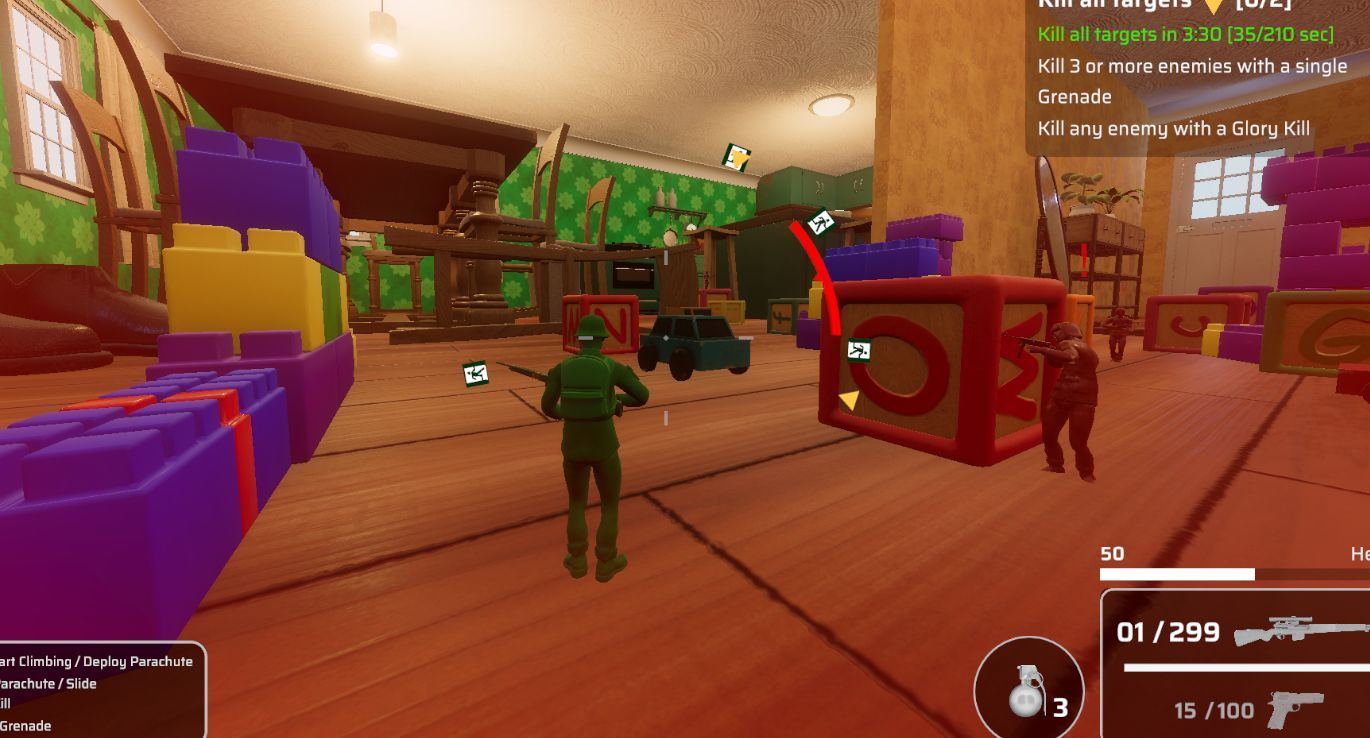
The final element which I would like to speak on is the players Radial UI. This was an idea I had for better showing to the player where their objectives actually are. It also is used to show the direction of incoming damage for accessibility purposes.
This uses a series of components with the one on the players hud being the Radial HUD Display. This component handles spawning the markers on the HUD along with grouping them together in the case of damage markers when they are very close to eachother. It does this by dividing the circle into sectors and then grouping the damage markets based on those.
// code here
player = GameManager.PlayerData.RotationRootTransform;
if (player == null) return;

// calculate angle same as marker
Vector3 dirToTarget = targetPosition - player.position;
dirToTarget.y = 0;
Vector3 forward = player.forward;
forward.y = 0;
float angle = Vector3.SignedAngle(forward, dirToTarget, Vector3.up);

// convert to a 360 degree range for the sectors
float normalizedAngle = angle;
if (normalizedAngle < 0) normalizedAngle += 360f;

// work out what sector it goes in
float sectorSize = 360f / sectorCount;
int sectorIndex = Mathf.FloorToInt(normalizedAngle / sectorSize);

// see if theres already one in the sector
if (activeMarkers.TryGetValue(sectorIndex, out var existingMarker) && existingMarker != null)
{
    // update the position
    existingMarker.targetPosition = targetPosition;
    // extend the life
    existingMarker.ResetTimer(markerShowTime);
    return;
}
// if no marker make one
It supports both live markers which move over time used for things like the games objectives, and static markers used for things like exfiltration points. There is also a component which can be added to any object to make it show up on the players radial HUD
The final product
Overall this is probably the biggest project I have ever worked on. I have had to push myself every single step of the way and have worked on a range of systems which I am extremely proud of. Not only was the project completed on time it was completed to an excellent standard, with several lecturers and our client saying that they were extremely impressed with the work that had been completed.
The game is fully playable and actually quite fun with all systems working as intended. There are currently no known game breaking issues with the only remaining problems being a few extremely minor ux bugs. The game was playtested in depth for all of the last 3 weeks of development to garuantee its stability for both the client and any potential players.
I am really proud of the work that I have managed to do myself ; both as an individual programmer, and as a lead. I think that I have absolutely grown as a person over the course of this project and I have learned a wide range of new techniques from my peers and our client. I am also extremely proud of every other person who worked on this project especially the two other programmers Ollie and Jasper who both have done an incredible job over the course of this project and it could not have been done without them.
I think my leadership skills have grown greatly with this project as well, as its probably the most varied set of skills and experience levels I have had to work with in a project before. I have solved countless issues with art importing, github usage, and everything inbetween. And I think it is quite clear how I have grown from the start to the end of it.
Finally I highly reccomend whoever is reading this to just go and play the game! It is not easy nor was it ever intended to be but if you give it a chance its actually a really rewarding gameplay loop and its very fun coming up with different strategies to try improve your time and score.
// video here